

Nowadays, people want to be able to stream anywhere: whether that is on your mobile device whilst on-the-go or, more comfortably, relaxing at home with the big screen of your Smart TV.
But one of the biggest questions, aside from picking where to stream your sports, movies and general entertainment is picking what to watch. With the streaming landscape now a vast place that offers all sorts of options, with streaming providers like Paramount+, Peacock, DAZN or ESPN Unlimited to pick from, did you know you can stream some of the best subscription apps via your Roku device?

With all these competing streaming players vying for new customers, picking one can be tough, but then utilizing it can be even tougher. Using the streaming service Paramount Plus on your Roku device is a straightforward process that opens up a world of entertainment at your fingertips.
Allow GOAL to take you through how Paramount+ works on Roku via your Smart TV, whether you're an existing customer or are ready to sign up, as we explain account registration, what settings are included, the types of shows and movies you can exclusively watch, and how to get the most out of one of the more wallet friendly streaming services on the market.
Setting up your Roku device
Firstly, you'll need to make sure your Roku streaming device is connected and set up properly. These steps will ensure you're ready to then add other platform subscriptions to the device.
Ensure your Roku device is properly connected to your TV via the relevant connections, such as HDMI and plugs.
Make sure your Roku device is connected to your home WiFi network.
Check your software version, in case you need to update the system. If outdated, update your Roku system via the app update option.
Verify your Roku device is compatible with Paramount Plus – which it should be, make sure it is Roku OS 11 or newer. To do so, you need to go into Settings > System > About.
Getting started with Paramount Plus on Roku
 Paramount / Roku
Whether you have the Essential or Premium plan, it's really easy to set up. So follow these instructions to open a connection between your Roku device to your Paramount+ subscription, so you can start enjoying your favorite movies and TV show episodes on whichever screen you wish.
To begin, simply navigate to the Roku Channel Store and search for the Paramount Plus app.
Once you've found it, select "Add Channel" to install it on your device.
After installation, launch the app and sign in with your Paramount Plus account credentials.
If you don't have an account yet, you can sign up quickly enough (there's more on this below). You can easily create one directly through the app or on the Paramount Plus website.
Once logged in at the login page, you'll have access to a vast library of content, including exclusive originals, popular TV shows, movies, and live sports.
The user-friendly interface allows you to browse categories, search for specific titles, and create watchlists for your favorite content. With Roku's intuitive remote control, you can easily pause, rewind, or fast-forward through your chosen programming. Whether you're a fan of classic series, blockbuster films, or cutting-edge originals, Paramount Plus on Roku offers a seamless streaming experience that brings premium entertainment right to your living room on your Smart TV.
If you're new to Paramount+
 Paramount+
Creating a Paramount Plus account: Set up and sign-in
Signing up for Paramount Plus via the website is easy. You'll need to pick between one of two subscription plans: Essential or Premium, as well as whether you want to subscribe monthly or annually.
Paramount+ currently has a free one-week trial so you can test out the service, so take advantage of free trial offers like this, meaning if you decide not to go ahead and move to a paid subscription, you won't have to pay a penny.
Next, you'll need to set up payment information for billing. Should you cancel before the free trial is over, your card won't be charged.
Paramount Essential versus Paramount Premium
The two pricing plans available are a base plan (Essential) and a top tier (Premium). Below outlines what each offers and shows the difference between what they provide subscribers.
You can subscribe as a standalone service as well as pick from various streaming bundle deals available with existing providers such as Fubo, where you can add on Paramount+ with SHOWTIME, for example.
Both Essential and Premium standalone plans offer different features, as noted below.
| Plan | Cost |
|---|---|
| Paramount+ Essential (Monthly) | $8.99 |
| Paramount+ Essential (Annual) | $89.99 |
| Paramount+ Premium (Monthly) | $13.99 |
| Paramount+ Premium (Annual) | $139.99 |
And both Essential and Premium offer different levels of features, meaning that, naturally, you'll get more for paying more.
| Feature | Paramount+ Essential | Paramount+ Premium |
|---|---|---|
| No ads except live TV | ✘ | ✓ |
| 40,000+ movies and shows | ✓ | ✓ |
| Stream on Three devices at once | ✓ | ✓ |
| NFL on CBS and UCL soccer | ✓ | ✓ |
| Access SHOWTIME Originals | Selected | ✓ |
| Download movies and shows | ✓ | ✓ |
| Stream CBS live, plus more sports | ✓ | ✓ |
Signing Into the Paramount+ app on Roku
Launching the Paramount Plus app on your Roku device is simple, especially once you've made sure your Roku is set up and have the Paramount Plus app downloaded to it, as outlined in the easy to follow steps above.
First, select the Paramount+ app on your Roku device and launch it.
As a means of logging in, it'll let you enter an activation code or enter your account credentials (so your email and password).
If you experience any problems, try troubleshooting sign-in issues – otherwise you're ready to watch.
 Getty Images
Navigating the Paramount Plus interface
If you're new to either of Paramount's Essential or Premium plan, once you've installed, completed the sign up and sign in prompt, you will be met with the Paramount+ home screen.
Understanding the main menu layout will help you navigate quickly to find the specific content you want to watch, whether it's live sports action on one of the ESPN channels or to watch one of their acclaimed original series productions.
You can browse all the provider's featured content and recommendations at a glance, seeing what is new and current. You can also quickly access recently watched shows and movies from here.
Tip: Use the Roku remote to navigate this area quickly and efficiently.
 Paramount+
Finding content to stream
In order to find exactly what you are looking for to stream onto your Smart TV, use the 'Search' function to find specific titles.
You can also browse content by categories, such as TV shows, movies, originals series, etc.
Customers can explore live TV options, including live sports events and studio programming.
You can discover new releases and trending content by scrolling through and exploring the home screen.
Using different profiles
Setting up multiple user profiles is easy, and each registered account can have up to six, meaning family members or people you live with can log in to their own profile with their own watchlists and preferences selected.
This also applies to younger viewers, allowing adults to create kid-friendly accounts for young people to use without there being grown up content available to them. Paramount+ offers a kids mode profile feature, so little eyes can't watch unsuitable adult content.
Switching between adult and child profiles is easy to do, via the 'Who's Watching?' screen, allowing you to create, edit and switch profiles.
Streaming Paramount+ content through Roku
 Paramount+
Shows and movies
You can pick from a wide selection of TV shows and blockbuster movies with Paramount, with the provider offering plenty of choice and a number of exclusives as well. Paramount is synonymous with Star Trek, offering up every single episode of their latest show, Strange New World, as well as Star Trek: The Animated Series, Star Trek: Picard and Star Trek: Lower Decks.
They also boast Tulsa King, Landman, the Star Trek franchises, MobLand, and brand-new episodes of South Park.
When it comes to Hollywood movies, Paramount has plenty to stream, with all the major Star Trek movies available in one place. The platform also has original movies exclusively available to stream here, including recent titles The SpongeBob Movie: Sponge on the Run, Paranormal Activity: Next of Kin, Beavis and Butthead Do the Universe, Teen Wolf: The Movie (2023), Pet Sematary: Bloodlines, Good Burger 2, and Vicious.
Watchlist and preferences
Adding shows and movies to your watchlist is easy, just click on the '+' icon and it'll save to your list. Remove by clicking it again.
Troubleshooting
If you're experiencing problems, there are a number of things to do or check that fix most Roku glitches.
System Restart
There is a major difference between pressing the power button on your remote, which generally just puts the device into "Sleep" mode and a full reboot. To fully clear your Roku's temporary cache and refresh the system entirely, you must perform a system restart via the software menu.
Go to Settings > System > Power > System Restart
Manually check for updates
Roku updates usually happen automatically in the background, but if the Paramount+ app is cashing specifically you may have missed a new patch. Forcing a manual check can often resolve compatibility issues straight away.
Go to Settings > System > Software Update > Check Now
Reinstall the Paramount+ app
If the app is corrupted, simply removing and reinstalling it often fails because the device remembers the old, corrupted data.
In order to fix this, you must follow the specific sequence in order to start a clean slate:
- Remove the app - Highlight Paramount+, press the * button on your remote and select Remove Channel
- Restart your Roku - This is the most important step. Perform the "System Restart" outlined above immediately after removing the app. This clears the old data from the memory.
- Reinstall - After the device boots back up, return to the Channel Store and download Paramount+ again.
How to cancel Paramount+ on Roku
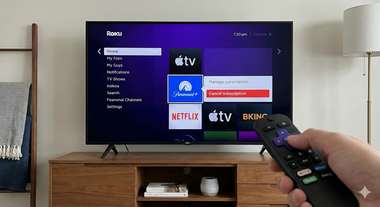
One of the most common points of confusion for subscribers is canceling their plan. The method you use depends entirely on how you signed up.
If you signed up for Paramount+ directly through your Roku device (using your Roku account payment info), you must cancel through Roku. If you signed up on the Paramount+ website and just logged in on your Roku, you must cancel via the Paramount+ website.
Here are the steps for both methods:
Method 1: Cancel directly on your Roku device
This is the fastest method if you are currently in front of your TV.
- Press the Home button on your Roku remote.
- Navigate to the Paramount+ tile in your channel grid (do not open the app).
- Press the Star (*) button on your remote to open the options menu.
- Select Manage Subscription from the list.
- Note: If "Manage Subscription" is not listed, it means you did not subscribe through Roku. Follow Method 3 below.
- Select Cancel Subscription and confirm your choice.
- You will see a confirmation message indicating when your access will end.
Method 2: Cancel via the Roku website
If you don't have access to your TV right now, you can manage your Roku-billed subscriptions online.
- Go to my.roku.comon your computer or smartphone.
- Sign in to your Roku account.
- Scroll down and click on Manage your subscriptions.
- Find Paramount+ in the "Active Subscriptions" list
- Click Unsubscribe or Turn off auto-renew.
Method 3: Cancel via Paramount+ (Direct Sign-Up)
If you pressed the Star (*) button on your remote and did not see a "Manage Subscription" option, it means you subscribed directly through Paramount.
- Go to paramountplus.com/account
- Log in with your email and password.
- Scroll to the Subscription & Billing section.
- Click Cancel Subscription and follow the prompts to confirm.
Regardless of which method you use, you will continue to have access to Paramount+ content until the end of your current billing cycle.