

We provide you with everything you need to know about Stake registration, from sign-up steps and bonus details to verification and login tips for Indian players.
Step-by-Step Guide for Stake Registration
Registering on Stake is quick, but missing a small detail can cost you the welcome bonus or delay verification. Follow these steps to get started smoothly.
Quick steps:
- Visit the official Stake website.
- Click on “Register” at the top right.
- Choose email or social sign-up.
- Enter the Stake bonus code GLSTAKE in the respective box.
- Complete the form and start playing.
Now, let’s break each step down in detail.
Step 1: Visit the Stake Site
Head over to Stake.com using your browser. The site automatically detects your region and shows content relevant to India. You’ll see sports odds in INR and casino games with localised options.
Step 2: Click the Register Button
On the homepage, click the green “Register” button. This opens a simple sign-up form. There’s no clutter here, just a clean layout that asks for essential information.
Step 3: Choose Your Sign-up Method
Stake offers two ways to create an account:
- Email registration - You enter your email, set a username, and create a strong password.
- Social sign-up -You can log in via Google, Facebook, or Twitch.
For Indian users, email sign-up is the most reliable method because it allows you to directly input your personal details, which helps during account verification.
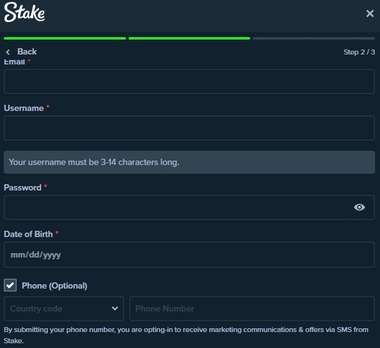
Step 4: Enter the Referral Code
Before submitting the form, make sure to enter our exclusive Stake promo code GLSTAKE to activate the welcome offer. If you skip this step, the Stake sign-up bonus won’t be automatically added. This is where most new players miss out, so double-check before you click “Create Account.”
Step 5: Confirm and Start Playing
Once you submit the form, your Stake account is created instantly. You can deposit, explore games, and place bets right away. However, withdrawals and bonus access require account verification, which we’ll cover later.
How Can I Sign up on the Stake App?
Let’s clear this up first: Stake does not have an official mobile app for Android or iOS devices.
Instead, Stake has a fully optimised mobile website. Whether you use Chrome, Safari, or any other mobile browser, the site adapts perfectly to your screen. Navigation, loading speed, and gameplay are smooth, even on mid-range smartphones.
This means:
- No need to download APK files or sideload apps.
- No risk of malware from fake apps.
- You get the same bonus, same games, and same odds on mobile as on desktop.
So, while the Stake app doesn’t exist, the mobile experience is still top-notch.
Stake Registration Bonus
Stake offers one of the most interesting welcome offers available to Indian players.
Bonus Offer:
200% matched bonus up to ₹1,20,000 on your first deposit.
Stake Registration Bonus Terms & Conditions
Here are the key terms of the Stake sign up bonus you need to know, simplified into bullet points:
- Minimum deposit: ₹500.
- Maximum bonus: ₹1,20,000.
- Wagering requirement: 40x.
- Claim the bonus in the first 24 hours and fulfill wagering requirements in 7 days.
- Only the first deposit is eligible.
- Bonus is valid only for users who sign up via the official link.
- Deposits via crypto are eligible, but fiat methods are limited for India.
Always read the full bonus terms on the site before making a deposit.
How to Do Stake Login?
Once you’ve completed your Stake registration, logging in is simple. Here’s how to do it in under a minute:
- Go to Stake.com.
- Click “Login” at the top right.
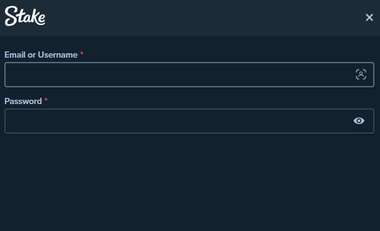
- Enter your email or username.
- Type in your password.
- (Optional) Complete two-factor authentication (2FA) if you’ve enabled it.
- You’re in, and ready to place bets or play games.
If you use the social login method, just click the relevant icon (Google, Facebook, or Twitch) and log in via that platform.
Stake Account Verification Process
To comply with KYC (Know Your Customer) requirements and unlock full withdrawal features, you’ll need to verify your Stake account. This is a one-time process and can be completed within a few hours.
Here’s how to verify your account:
- Go to Account Settings → Verification.
- Upload proof of identity (passport, Aadhaar, or driver’s licence).
- Upload proof of address (utility bill or bank statement).
- Wait for the verification team to approve your documents.
- Once approved, your account status will show as “Verified”.
Verification protects you from fraud and ensures secure withdrawals.
Documents Required to Verify the Stake Account
Make sure your documents are clear and valid. Here’s what you’ll need:
- Government-issued photo ID (Aadhaar card, Passport, or Driver’s Licence).
- Proof of address (utility bill, bank statement, or rental agreement).
- Optional: A selfie holding your ID (sometimes requested for added security).
Accepted formats include JPG, PNG, and PDF. File size should not exceed 10 MB per document.
Things to Watch out for during Stake Registration Process
Here are important points every Indian player should know before or during the Stake registration process:
- Use the right registration method:
Social login (Google or Facebook) is fast, but email sign-up is more reliable for verification and password recovery. - Enter the Promo Code Correctly:
The bonus is not applied retroactively. You must enter the correct Stake promo code GLSTAKE during registration. - Submit documents early:
Don’t wait until your first withdrawal to verify your account. Upload your documents soon after registering to avoid payout delays. - Crypto deposits only:
Stake primarily supports cryptocurrencies like Bitcoin, Ethereum, Litecoin, etc. Indian users must buy crypto via trusted exchanges (like WazirX or CoinDCX) before depositing. - Enable 2FA for security:
Two-factor authentication protects your account from unauthorised access. It’s easy to set up via Google Authenticator.
Editor’s Final Opinion on Stake Registration
Our editorial team completed the Stake registration process from start to finish using an Indian IP and a test wallet. The entire journey, from visiting the site to receiving the bonus, was easy and smooth.
Here’s what stood out:
- The registration form is short and user-friendly.
- The 200% matched bonus up to ₹1,20,000 is one of the best available in India.
- The verification process is transparent and fast when documents are correctly uploaded.
After completing my own Stake registration from India, here’s my honest take.
I found the Stake sign up process to be straightforward and, more importantly, quick. From the moment I clicked the registration link to when the bonus reflected in my account, it was under ten minutes. That’s faster than I expected. One detail that stood out was the payment flexibility. I could use crypto, Bitcoin in my case, but Stake also supports INR through their payment partners, which makes it easier for players here.
When I compared it with other betting platforms I’ve tried in India, Stake felt noticeably lighter and more modern. The site loads fast, and the design works well on smaller screens. There isn’t a dedicated Stake app, but honestly, I didn’t miss it.
The Stake sign up bonus compares well to rivals. That said, the 40× wagering requirement is tough, it’s doable, but you’ll want to pace your bets instead of rushing.
The only hiccup I ran into was with the verification email. It didn’t arrive right away and actually ended up in my spam folder after about 15 minutes. Not a huge problem, but if you don’t see the confirmation mail quickly, check your spam tab.
All in all, in my quick Stake review, it felt reliable and easy to use. The bonus is strong, the platform is stable, and aside from that minor email delay, I had a smooth experience.
FAQs about Stake Registration
Here are the FAQs:
How do I sign up on Stake?
Go to the Stake website, click on “Register,” choose email or social login, enter the promo code, and complete the sign-up form. Your account will be created instantly.
Is Stake registration legal in India?
Yes, Stake operates internationally and accepts Indian players. It is safe to place bets on Stake.
What documents are required to verify the Stake account?
You’ll need a government-issued ID (Aadhaar, passport, or driver’s licence) and a proof of address (utility bill or bank statement) to complete verification.
What to do if I forget the Stake login password?
If you can’t remember your password, just click “Forgot Password” on the login screen. Type in the email linked to your account, and Stake will send you a reset link. Open that email, set a new password, and you’re back in.